Stream Deck plugin
Codex Control
Control Codex task settings from your Stream Deck.
Codex settings, within reach
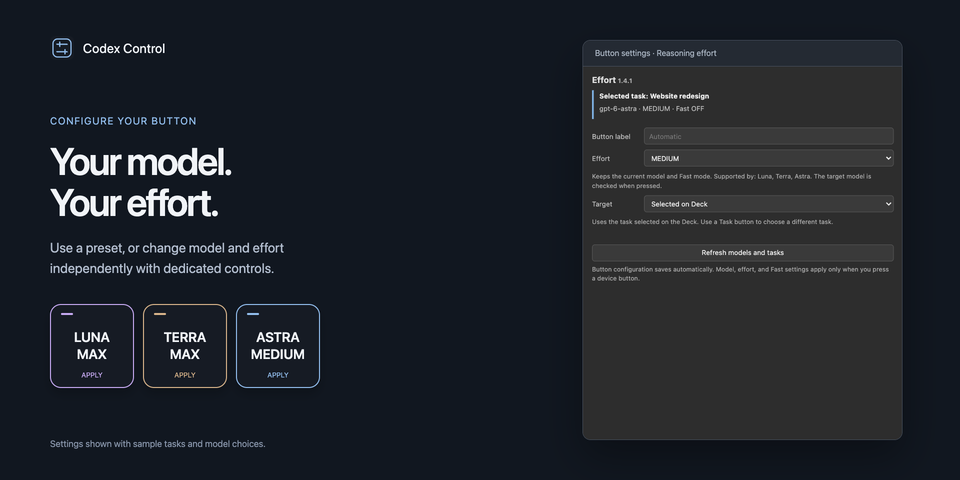
Choose the model, reasoning effort, and Fast mode for a Codex task using Stream Deck buttons. Presets can apply settings together.
Changes apply to the next turn, not a response already running. The plugin does not submit prompts.
Build your next turn, one setting at a time
- Bring the Codex task you want to change to the front.
- Press a Model key, an Effort key, and the Fast key in the combination you want. Each action keeps the other settings.
- If a model and effort cannot be applied one at a time, use a Preset key to change both together. Send your next message in Codex as usual.
Editing a button's configuration alone does not change a task. You press the physical key to apply it.
Free starter layout for 15-key Stream Deck
Plugin version 1.5.5 and later includes an editable Mac starter profile with separate GPT-6 Luna, Sol, and Astra model keys, Medium through MAX effort keys, Fast, task navigation, and status. When Stream Deck offers the profile, choose whether to install it, then select it from the profile menu. Installation does not automatically switch your active profile. Check the Marketplace listing for the version currently available; earlier versions can be set up with individual plugin actions.
Requirements
macOS 13 or later, Stream Deck 7.1 or later, and a running, signed-in Codex Desktop app are required. Current-window mode uses Accessibility access and temporarily copies the task link to the clipboard.
This is an independent integration, not an official OpenAI or Elgato product. Compatibility can change after Codex updates.
Setup
See the installation guide and troubleshooting.
From the app